Clean Hangar – a tidy garage with your stats
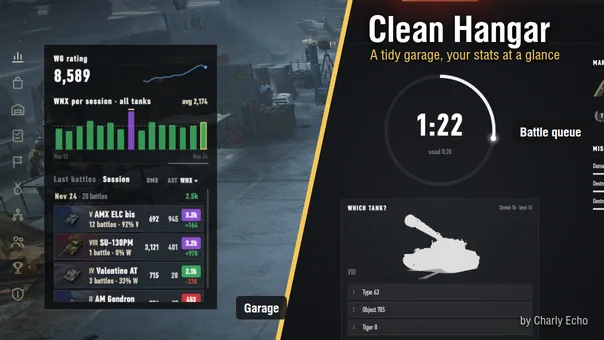
Clean Hangar declutters the WoT garage: tank search, At a glance summary (MoE, mastery, credits), WNX stats, animated turret and queue screen.
Download Clean Hangar – a tidy garage with your stats 0.45.1
For World of Tanks 2.4.2.0
com.charlyecho.hangar_clean_0.45.1.zip, 187 KB
Released on
About Clean Hangar – a tidy garage with your stats
Clean Hangar declutters the garage of the 2.4 client and puts your own statistics where you can read them, in the game's own style and font.
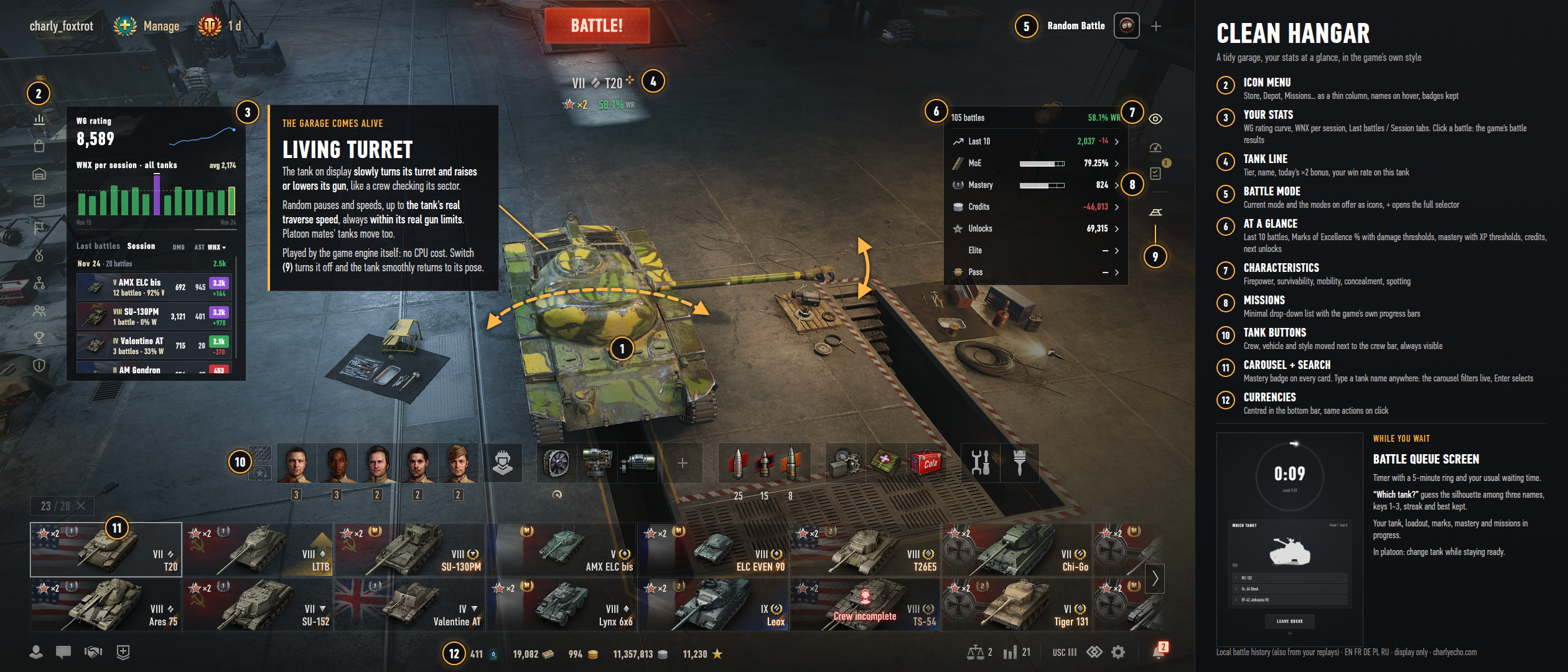
TIDY GARAGE • The left menu (Store, Depot, Missions…) becomes a thin column of icons, name on hover, notification badges kept • Battle mode in the top bar, right side: current mode and the modes on offer as icons, "+" opens the full selector • Currencies moved to the centre of the bottom bar, same actions on click • The missions block becomes an icon in a right-hand column with a minimal drop-down list • Crew, vehicle and style buttons moved next to the crew and equipment bar, which stays visible • Tank line: tier and name, today's XP bonus, win rate; mastery badge of every tank on its carousel card • Tank search: type a tank name in the garage, the carousel is filtered while you type, Enter selects • The tank on display slowly turns its turret and raises or lowers its gun, within its real limits (can be switched off at the bottom of the right column)
STATS PANEL (icon at the top of the left column) • WG rating with its recent curve • Average WNX per session, all tanks (tomato.gg colours) • Last battles and Session tabs: tank, damage, assist, WNX; sessions follow the game's own daily reset; click a battle to open the game's battle results
AT A GLANCE (right column, selected tank) • Battles and win rate; last 10 battles; Marks of Excellence with damage thresholds; mastery badge with XP thresholds and your best base XP; credits per battle; next unlocks with the XP left; elite level; Battle Pass points on this tank • Characteristics: firepower, survivability, mobility, concealment, spotting, with details
BATTLE QUEUE SCREEN (random battles) • Timer with a 5 minute ring and your usual waiting time • Your tank, modules and loadout, its marks and mastery progress, missions in progress, platoon members • "Which tank?": guess the silhouette among three names while you wait (streak and best kept) • Leave queue button and Esc, as in the game
PLATOON • Platoon banner under the tank line (ready state, invite, leave) • Change tank while staying ready (same tier)
LOCAL BATTLE HISTORY After each random battle, your own official results (tank, damage, assist, kills, spots, XP) are saved on your PC, per account and server. Your replays, if any, are read in the hangar to fill the history of past battles. Replays are never modified. Nothing is sent anywhere.
• WNX expected values, Marks of Excellence thresholds and mastery thresholds for your server (EU, NA, ASIA) are shipped with the mod and refreshed online (download only) • Files saved in mods/configs/com.charlyecho.hangar_clean • English, French, German, Polish, Russian (follows the game language) • Display only: reads your own garage, results and replays; no change to gameplay • Compatible with mods that modify the 3D hangar model (custom hangars)
Included: OpenWG Gameface (required).
Author: Charly Echo · https://charlyecho.com
Screenshots
Releases
-
Version 0.45.1 (latest)
Released on · World of Tanks 2.4.2.0 · 187 KB
- Replay import: each block size is checked against the file, the results block read is capped at 1 MB, and invalid or oversized replays are skipped (never read again), so they cannot stall the Garage
- Platoon: a pending "change tank while staying ready" is cancelled when the Garage closes or the mod unloads
- Listing: mastery thresholds are also refreshed online, like WNX values and MoE thresholds (download only)
- At a glance: the selected tank's icon, tier and name above its stats (battles / win rate); all bars use the game's dotted progress bar, green when reached; Unlocks shows a bar when one tank is left to research
- Missions: the game's progress bars, white texts, progress and total on one line
- Removed the queue screen preview shortcut (Ctrl+Shift+Q)