Battle WNX – two quiet lines above your damage counter
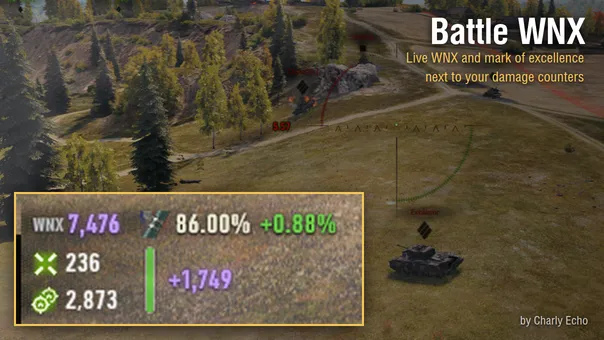
Shows your live WNX and Mark of Excellence progress (with damage still needed) above the HUD damage counters, in battle and replays.
Download Battle WNX – two quiet lines above your damage counter 0.9.6
For World of Tanks 2.4.2.0
com.charlyecho.battle_wnx_0.9.6.zip, 89 KB
Released on
About Battle WNX – two quiet lines above your damage counter
Battle WNX shows how well your current battle is going, right above the game's damage, blocked and assist counters, in the same size, font and background as the game's own lines.
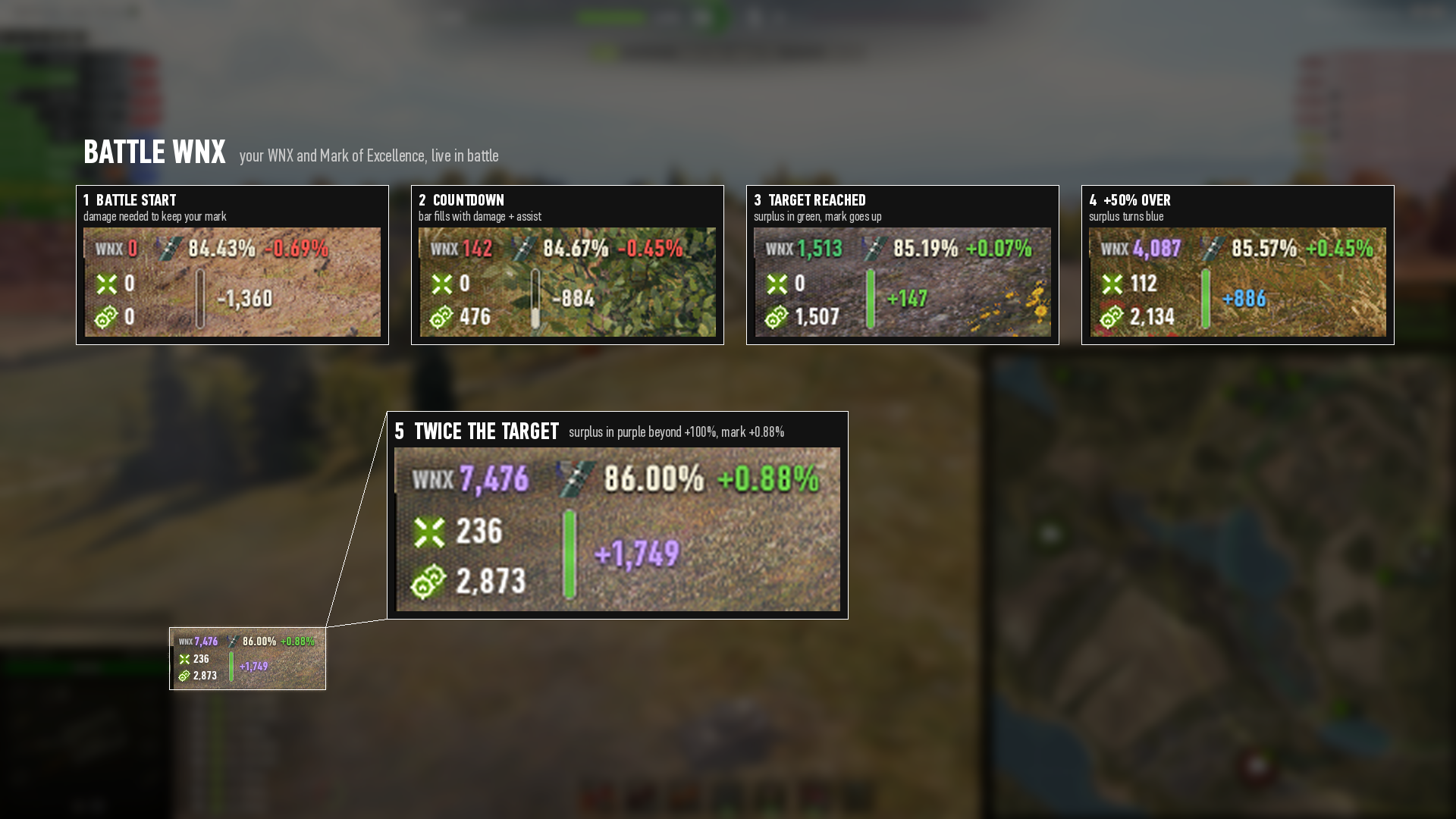
WNX OF THE BATTLE • A performance rating (tomato.gg formula) comparing your damage, assist, kills and spots with the values expected for your tank • Colored on tomato.gg's scale: red below 682, yellow below 1,122, green below 2,884, purple above • Short pulse when the color changes • If the game is restarted or reconnects during a battle, damage, assist and kills come back from the server but earlier spots cannot: the value then ends with "+" (the real WNX is higher)
MARK OF EXCELLENCE (tier V and up) • Your tank's marks icon, the mark percentage you would have if the battle ended now, and its change since the start of the battle (green up, red down) • A small bar of your combined damage (damage + best of spotting, tracking or stun assist) towards your tank's moving average, replaced by a green check once reached: from there your mark goes up • Your marks and moving average are read in the garage when you start a battle
ALSO IN REPLAYS Replays of random battles show the WNX and the mark line too, and stay right when you skip forward or back.
DISCREET • Hidden on the loading screen, when the interface is hidden (V) and after your tank is destroyed when the camera follows another tank • Random battles only
HOW IT WORKS WNX expected values and mark thresholds for your server (EU, NA, ASIA) are shipped with the mod and refreshed online (download only), the last copy is kept for offline use.
• Files saved in mods/configs/com.charlyecho.battle_wnx (marks read in the garage: one file per account and server) • Reads only your own tank and battle; no change to gameplay
Included: OpenWG Gameface (net.openwg.gameface, required).
Author: Charly Echo · https://charlyecho.com
Screenshots
Releases
-
Version 0.9.6 (latest)
Released on · World of Tanks 2.4.2.0 · 89 KB
- New layout: the mark of excellence (marks icon, projected %, change) moves to the WNX line, one line less above the counters
- Vertical bar next to the damage and assist counters, filling with your combined damage towards your tank's moving average
- Damage still needed shown as a countdown ("-884"), then the surplus once reached ("+312"): green up to +50% of the target, blue up to +100%, purple beyond
- The bar follows the counters enabled in the game settings (damage, blocked, assist)
- The background of the WNX line stretches to its content
-
Version 0.8.2
Released on · World of Tanks 2.4.2.0 · 88 KB
- Replays: each block size is checked against the rest of the file and the results block read is capped at 1 MB before decoding; a damaged or oversized replay is skipped
- Marks read in the garage are saved per account and server (marks--.json): one account's values are never used for another; the old shared marks.json is no longer read